

File Format Description Language Specification#
- Authors:
Hailing Fang
- Email:
- Version:
0.3.1
- Create Date:
20230401
- Update Date:
20260605
Introdution#

File Format Description Language (FFDL) is a language for describing the format/layout of binary or plaintext files.
It has two components: FFDL sentences and FFDL programming language stataments.
FFDL Sentences#
The FFDL sentences are used to describe data blocks of files.
A sample FFDL sentence have three parts: […], <…> and (…).
There is an example of a FFDL sentence:
[5]<int>(name="sample sentence")
The ‘[…]’ is count part of the FFDL sentence, and is necessary.
The ‘<…>’ is element part of the FFDL sentence, and is optional.
The ‘(…)’ is label part of the FFDL sentence, and is optional.
A complex FFDL sentence use ‘{…}’ instead of the ‘<…>’ part. The ‘{…}’ is used to holding the FFDL sentences.
For example:
[2]{
    [2]<int>
    [1]<double>
    [8]<uint8>
}(name="comple sentence")
The ‘[…]’ Part#
The ‘[…]’ part of a FFDL sentence is called count part.
Where ‘…’ can be an expression. The value of the expression is 0 or a positive integer that representing the number of elements defined by ‘<…>’ part in the FFDL sentence.
Example:
[2 + 3]<int>
The ‘…’ can be an array of 0 or positive integer. It represent that a block with complex element.
Example:
[[1, 2, 3]]<[int, int, float]>

#is equal to:
[1]{
    [1]<int>
    [2]<int>
    [3]<float>
}
For sometimes, the number of elements vary, and is depended on the actural data file that FFDL described. To address this, the ‘…’ can be an range write as ‘(a, b)’ to express that the number of element is between a and b, where a and b are included. If ‘b’ is missed, the range of the number is a to the positive infinaty.
Example:
[(5, 10)]<int>
[(4, )]<float>
Because the count range: ‘(0, 1)’, ‘(0,)’ and ‘(1,)’ is used frequently. There are three shortcut mark for them.
Example:
[(0, 1)]<int>
#equals to
[?]<int>

[(0, )]<int>
#equals to
[*]<int>

[(1, )]<int>
#equals to
[+]<int>
The ‘…’ can be a choice for number that embraced by ‘{}’.
Example:
[{0, 1, 3}]<int>
The value of count part can be refered by a variable. For underterminated count number this may do some help for convience.
Example:
[(0, ); :count_num]<int>
There are some complex examples:
[[{1, 2, 3}, {4, 5, 6}, {7, 8, 9}]; :[va, vb, vc]]<[int, float, double]>
[[(1, 2), (4, 5), (7, 8)]; :[xa, xb, xc]]<[int, int, int]>
Note
Although an array is allowd in count, you would better to use scalar to keep FFDL sentences sample and clear. Use ‘{…}’ to describe complex structures.
The ‘<…>’ Part#
The ‘<…>’ part of a FFDL sentence is called element part.
The ‘…’ is a element type. There are element types that have been defined.
Element Type |
Byte Size |
Note |
|---|---|---|
bit |
1/8 |
1 bit |
byte |
1 |
8 bits |
char |
1 |
a signed 8 bits integer |
int8 |
1 |
same as ‘char’ |
uint8 |
1 |
an unsigned 8 bits integer |
short |
2 |
signed 16 bits integer |
int16 |
2 |
same as ‘short’ |
uint16 |
2 |
an unsigned 16 bits integer |
int |
4 |
a signed 32 bits integer |
int32 |
4 |
same as ‘int’ |
uint32 |
4 |
an unsigned 32 bits integer |
long |
8 |
a signed 64 bits integer |
int64 |
8 |
same as ‘long’ |
uint64 |
8 |
a unsigned 64 bits integer |
float |
4 |
a 32 bits float number |
float32 |
4 |
same as ‘float’ |
double |
8 |
a 64 bits float number |
float64 |
8 |
same as ‘double’ |
string |
vary |
only used for plaintext file, the string do not contain white characters by default |
The ‘…’ can be an array of element type.
Example:
[4]<int>
[[2, 3, 4]]<[int, char, double]>
In element part, the values that stored in file actural can be asserted to should to specific values.
Example:
[1]<int; =5>
[3]<float; =[1.0, 3, 4.8]>
The value that store can be asserted that should within a range. The number for range is write in ‘()’, if edge value is not include, use ‘-’ to represent this. ‘-(1, 4)-’ mean 1 to 4, but 1 and 4 is not include in the range.
Example:
[1]<int; =(5, 9)>
[2]<float; =[(4, 7)-, (9, 10.03)]>
The value that store can be asserted should be an option of choices.
Example:
[1]<int; ={1, 2}>
[3]<float; =[{1, 2}, {4, 5}, {5, 6}]>
Can compare a specific element with a value and assert them equal.
Example:
[5]<int; [2]=4>
Can assert that all element in the block should equal to a specific number. Or a slice be equal to a specific number.
Example:
[100]<int; [:]=7>
[1000]<int; [0:10]=2>
A slice of block’s element can compare with an array.
Example:
[100]<int; [0:4]=[1, 2, 3, 4]>
For the asserting about choices and range of a specific element or slice of element is same to the comparision with values.
Example:
[100]<int; [:]={1,2,3}>
[1000]<int; [:4]={3, 4, 5}>
[1000]<int; [:4]=[{1, 2, 3}, {4, 5, 6}, {7, 8, 9}, {10}]>

[100]<int; [:]=(10, 15)>
[100]<float; [:4]=(1, 4)>
[100]<float; [:4]=[(1, 2), (4, 5), (6, 7), -(100, )]>
The elements can be refered by variables. If the data block has only one element, the variable refer to a scalar, otherwise an array.
Example:
[1]<int; :a>
[4]<float; :b>
The a slice of block can be refered by a variable.
Example:
[100]<int; [:]:x>
[100]<int; [:10]:y>
[[10, 20]]<[int, float]; [[:], [:4]]:[x, y]>
Note
In order to keep FFDL sample and clear, user should shoud use labels in ‘(…)’ for some long string in ‘<…>’.
The ‘(…)’ Part#
The ‘(…)’ part of FFDL sentence is called label part.
In this part, labels with a label name and a label value is added. The label value is embraced by ‘””’. The labels can record all information including that in count part and element part part. So user can let count part and element part empty, and record the information by labels.
Example:
[4]<int; [:]=5>
#equals to
[]<>(count="4";
     element_type="int";
     element_value="[:]")
Here is labels that can replace the ‘…’ in ‘[…]’ and ‘<…>’.
Label Name |
Label Value |
Example |
|---|---|---|
count_type |
element_number, byte_length, offer. The defaule is element_number |
[]<>(count_type=”element_number”) |
element_number |
an expression |
[]<int>(element_number=”12”) |
byte_length |
an expression |
[4]<int>(byte_length=”16”) |
offset |
an expression |
[1]<char>(name=”filetype”, offset=”0”) |
count |
an expression |
[]<int>(count=”4”) |
count_range |
an range |
[]<int>(count_range=”(4, 10)”) |
count_choices |
a choices |
[]<int>(count_choices=”{4, 5, 6}”) |
count_reference |
a variable name |
[1]<int>(count_reference=”:var”) |
element_type |
element_type |
[1]<>(element_type=”int”) |
element_value |
a scalar or array |
[3]<int>(element_value=”=[1,2,3]”) |
element_value_range |
an range |
[4]<int>(element_value_range=”[:]=(1, 10)-“) |
element_value_choices |
an choices |
[4]<int>(element_value_choices=”[:]=2”) |
reference |
a variable |
[4]<int>(reference=”:x”) |
Here are other labels that have been defined. The use can define there own labels.
Label Name |
Label Value |
Example |
|---|---|---|
name |
a name for the data block |
[2]<int>(name=”header block”) |
id |
a uinque id for a block |
[32]<float>(id=”magic_number”) |
description |
||
lthan |
a number that value of elements should less than |
[5]<int>(lthan=”[:]<12”) |
lethan |
a number that value of elements should less equal than |
[5]<int>(lethan=”[:]<=12”) |
gthan |
a number that value of elements should greater than |
[5]<int>(gthan=”[:]>12”) |
gethan |
a number that value of elements should greater equal than |
[5]<int>(gethan=”[:]>=12”) |
encode |
if the block represent a string, give the encoding schame |
[*]<char>(encode=”ascii”) |
string_end_marker |
0 |
should be 0, if present in labels part, the string is marked end with 0 |
NA |
the value for NA |
[1]<string>(NA=”0”) |
apple |
apple a function to data block |
[100]<byte; :x>(apply=”res=decode(x)”) |
Some labels that may useful for a plaintext file.
Label Name |
Label Value |
Example |
|---|---|---|
regex_pattern |
regular expression that should match the string |
[1]<string>(regex_pattern=”^w”) |
block_end_with |
a block end with |
[*]<char>(string_end_marker=”0”; block_end_with=”n”) |
elements_separator |
elements separator |
|
sorted |
the elements are sorted |
[10]<int>(sorted=”increase”) |
sorted_fun |
the function be use when comparing |
[10]<string>(sorted_fun=”lambda x: int(x)”) |
order_reference |
represent the of elements |
[100]<int>(order_reference=”name_order”) |
align_with |
the element in this block should align with the order. The order matters |
[100]<string>(align_with”name_order”) |
The ‘{…}’ part#
The ‘{…}’ part of a FFDL sentence is called complex element part.
It is used to construct a complex element.
Example:
[2]{
    [1]<int>
    [2]<char>
    [4]<float>
}
The element is make of one int, follwed by 2 char, and then 4 float.
The ‘{…}’ can be emplemented in another ‘{…}’.
Concepts and Terminology#
A FFDL describe a data block. The data block is make of element described by ‘<…>’ part or ‘{…}’ part.
Diagram for the block and elements of block.
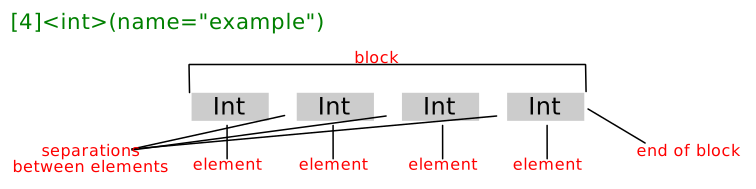
A ‘{…}’ if a FFDL sentence make a complex elements. The block is make of one or more complex elements.
The end of blocl is data at the end of a block. The element separator is data between elements. Those two concepts is useful in plaintext FFDL repretension.
FFDL Programming Language Stataments#
The FFDL programming language stataments are use to do calculation and flow control. It works like C and Python programming language.
Variable#
The rule for naming a variable is same as it in C or Python.
Data Types#
Number and String#
Integer, float and string are support in FFDL programming language. A char in ‘’ is a integer same as in C. The string can be concatenated by ‘+’ operator.
Example:
a = 12;
b = 3.14;
c = "hello world"
d = 'a'
List and Dictionary#
List and dictionary are implemented in FFDL programming language. It behave just like it in Python, even the attributes of the it are same as it in Python.
Example:
li = [1, 2, 'a', "hello"]
li.append(3)
dic = {"ab": 1, 2: "bc"}
Built in Variables/Object#
There are built in variables or objects to refer to specific objects.
objects |
notes |
example |
|---|---|---|
fileself |
refer to the file that described |
fileself.open(“rb”); fileself.seek(8, 0); #move to files’ offset 8 |
None |
refer to nothing |
a = None; |
Expression#
Numbers, string, functions operated by operators make an expression.
Arithmetic Operators#
Operators |
Name |
Examples |
|---|---|---|
+ |
plus |
3 + 4; “hello “ + “world” |
- |
minus |
3 - 4 |
* |
mulitiply |
2 * 3 |
/ |
divide |
4 / 3 |
// |
integer divide |
4 // 3 |
% |
mod |
4 % e |
** |
expernation |
2**3 |
= |
equal |
var = var * 2 |
The operatons that ‘++’, ‘–’, ‘+=’, ‘-=’, ‘*=’, ‘/=’, ‘//=’, ‘%=’, ‘**=’ are also supported.
Relational and Logical Operators#
Operators |
Name |
Examples |
|---|---|---|
> |
greater than |
4 > 3 |
>= |
greater equal than |
4 >= 3 |
< |
less than |
4 < 3 |
<= |
less equal than |
4 <= 3 |
== |
be equal |
4 == 3 |
!= |
not equal |
4 != 3 |
&& |
logical ‘and’ |
0 && 1 |
|| |
logical ‘or’ |
0 || 1 |
! |
logical ‘not’ |
!(3) |
Bitwise Operators#
FFDL programming language support bitwise operatons, the behavior is just like that in C.
Operators |
Name |
Examples |
|---|---|---|
& |
bitwise AND |
8 & 0 |
| |
bitwise inclusive OR |
8 | 0 |
^ |
bitwise exclusive OR |
8 ^ 0 |
<< |
left shift |
2 << 2 |
>> |
right shift |
16 >> 2 |
~ |
one’s complement |
~8 |
Statament#
A expression with with a ‘;’ make a statament.
There are other stataments that make FFDL programming language control complete.
Conditions#
if (Expression) {
    stataments or FFDL sentences;
} elif (Expression) {
    stataments or FFDL sentences;
} else {
    stataments or FFDL sentences;
}
Example:
[1]<uint16; :num>
[1]<int; :flag>
if (flag == 1) {
    [3]<float>
}
elif (flag > 1) {
    [4]<float>
} else {
    num_char = flag * num;
    [num_char * 2]<char>
}
Note
A label part can be added to ‘if’ statament. For example: if (1) {[10]<int>}(id=”block_x”). Same is true for ‘for’, ‘while’ and ‘goto’ stataments.
Loops#
Two types of ‘for’ stataments supported, one behave like it in C, and another behave like it in Python. The statament ‘continue’ and ‘break’ are support in a loop.
for (init_Expression1; compare_Expression2; calcu_Expression3) {
    stataments or FFDL sentences;
}

for (ele in ele_s) {
    stataments or FFDL sentences;
}
Example:
for (i = 0; i < 10; i++) {
    [i**2]<char>
}

ele_s = [1, 2, 3];
for (ele in ele_s) {
    var = ele * 2;
    [var]<int>
}
The ‘while’ statament is supported.
while (Expression) {
    stataments or FFDL sentences;
}
Example:
x = 10;
while (x > 0) {
    [3]<float>
    x--;
}
If a data block have n elements, where n greater than 1, the stataments in ‘{…}’ will execuate n times.
Example:
y = [];
[3]{
    [1]<int; :x>
    y.append(x)
}
In the example, the y list will have 3 elements that stored in the data block.
goto statament#
The FFDL programming language support ‘goto’ statament, the ‘goto’ should follow a integer for offset from described file’s begaining.
goto (offset) {
    stataments or FFDL sentences;
}
Example:
[1]<uint32; :data_start_offset>
goto (data_start_offset) {
    [1]<int>
    [24]<double>
}
Define Functions#
fun func_name(args, ...) {
    stataments;
}
Example:
fun test(a, b) {
    return a + b;
}
Built in Functions#
Functions |
Notes |
Example |
|---|---|---|
sum |
sum list of integer |
a = [1, 2, 3]; b = sum(a); |
len |
get length of a list or dictionary. |
len([1, 2, 3]); |
int |
convert a string to int |
int(“123”); |
str |
convert a number to string |
str(123); |
float |
convert integer to float |
float(123); |
open |
open a file |
open(‘require.txt’); |
Other Stataments#
statament |
example |
|---|---|
assert |
assert 1 == 2; |
raise |
raise “an error”; |
import |
import FFDL_modul; |
export |
export an_variable; |
require |
require infor.txt; |
def |
def filetype plaintext; |
deflabel |
def optional “the value is bool, if True the block is not required” |
import and export stataments#
FFDL programming language can import other FFDL file format description file as a module/library. The export variable will visiable in importing FFDL file.
Example:
#lib.FFDL
export x;
export add;

x = 123;
fun add(x, y) {return x + y;}

#b.FFDL
import lib;

[lib.x]<int; :x_value>
y = add(x_value[0], x_value[1]);
require stataments#
Some, a FFDL file would like to offer a function that parse the store data into a data structure. When doing this, other file make need.
Example:
#in FFDL1.FFDL file 1
def filename file_a


#in FFDL file 2
import FFDL1;
require file_a;

fin = open(file_a);
lines = [line.rstirp() for line in fin];
def stataments#
To define some attributes of described file.
Example:
def filetype binary;
def encode ascii;
def filename fname_a;
When the FFDL file is imported by other FFDL file, the define attributes is visiable to it.
deflabel stataments#
If defined labels used in ‘(…)’ not satify user’s requirements. One can define labels, to extend meaning of FFDL sentences.
Comments in FFDL Programming Language#
A line start with ‘#’, the line is a comment.
For example:
# [3]<int>
Contents within ‘/’ and ‘/’ are regard as comments.
For example:
/*
    [3]<int; float_num>
    [float_num]<float>
*/
Comment FFDL Sentences#
If a ‘#’ present in ‘[…]’ part after ‘[’, the sentence is a comment.
Example: